


REFORMA
3.6530.00 Reviews
App Specs
- Version
- 4.4.1
- Updated On
- License
- Free
- Downloads
- 100,000+
- Developer
- Grupo REFORMA
- Categories
- News & Magazines
- Platform
- Android
Screenshots





 Analysis by AppCompare
I often judge a news app by whether it can fit into ordinary household routines, not just by how many headlines it can show. REFORMA is a news and magazines app from Grupo REFORMA, and I can see it working well on a shared tablet or phone when different people want to check the news at different moments. Its appeal is straightforward: it gives readers a place to follow current stories, while leaving room to decide how much attention to give each topic.
A shared screen, separate reading habits
Picture a tablet on the kitchen counter: one person checks the headlines over breakfast, another opens it after work to catch up on sports or public affairs. A publication-focused app can make that routine simpler than passing around separate links from a browser, especially when readers already want to keep up with Grupo REFORMA’s journalism. The useful household habit is to treat the device as shared but the reading choices as personal: each person can go directly to the sections that matter to them rather than assuming one feed suits everyone.
That distinction matters because news is not a neutral background activity for every reader. A household member looking for a quick overview may want only a few headlines, while someone else may prefer to spend more time with a developing story. I would use the app as a shared doorway into reading, not as a claim that everyone has the same interests or should follow the same mix of coverage.
Set expectations before handing over the device
Because a shared screen can blur who is reading what, I’d agree on a simple routine before making the app a household fixture. Readers can take turns, close the app when finished, and avoid treating another person’s open screen as a recommendation for everyone else. If the device is also used for school, work, or entertainment, a clear handoff prevents one person’s news session from becoming another person’s starting point.
I would also distinguish between sharing access to a device and sharing an account. If several people plan to use the same phone or tablet, they should check how the app handles sign-in and purchases before making assumptions about privacy or billing. That is particularly sensible when in-app purchases are available: the app is free to install, but optional paid items range from $2.49 to $167.25 each. I’d review any purchase decision with the person responsible for the account rather than letting a casual tap settle it.
Coordination without turning news into a chore
A little coordination can make a shared news routine more useful without creating a formal schedule. For example, one reader can mention a story worth discussing at dinner, while everyone else can choose whether to open it themselves. That keeps the app in the role of a reading tool instead of making the phone a household bulletin board that demands constant attention.
I’d be cautious about relying on any single news app as the household’s entire picture of current events. REFORMA is most useful when readers want its particular journalism; comparing an important story with other reputable coverage can add context and show where reporting or emphasis differs. For a quick daily check, staying within one publication is convenient. For a complicated issue, a second source is a better choice than assuming one app has settled every question.
Worth Reading Before You Choose

EA SPORTS FC Mobile 26 Is a Bigger Football Game, but It Takes Time

Flipboard Shows What News Apps Must Do Beyond the Feed

Switching to Android Auto Means Rethinking Your Driving Routine

Google Calendar Makes a Crowded Week Easier to Manage

Ludo King Makes the Most of the Minutes Between Plans

Baby Panda World Brings Quick Play to Modern Phones, but Its Game Library Feels Busy
Age, trust, and a sensible reading context
The app carries a Teen content rating, which gives families a useful starting point but is not a substitute for deciding what suits a particular reader. I would consider a young person’s maturity, the subjects they are likely to encounter, and whether an adult is available to discuss difficult news. Current affairs can involve serious events, so a family may prefer to read together or talk afterward rather than treating the age label as a guarantee that every story will feel comfortable.
REFORMA has a 3.6 average rating from around 2,400 ratings, with more than 500 written reviews, and it has over 100,000 installs. I see those figures as a snapshot of broad interest, not a promise that every reader will have the same experience. If the app is being considered for a household, the more useful test is whether its coverage and day-to-day reading experience fit the people who will actually open it.
Its long-running presence is also part of the context: REFORMA was released on April 15, 2010, and version 4.3.9 is the current version. It is free to download and requires Android 6.0 or later. Those details make it practical to consider for a compatible Android device, but I would still check that the phone or tablet has enough room and works comfortably for the people sharing it before building a routine around it.
Getting to Know REFORMA
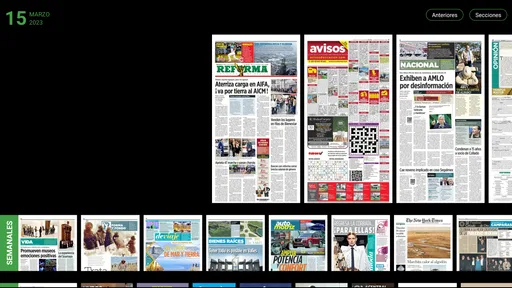
When I first opened the app, I was greeted with a clean and intuitive interface. It’s like a breath of fresh air compared to some other cluttered news apps out there. The layout is as simple as it gets, with a neat homepage that showcases the top stories of the day. You can easily scroll through the headlines and get a quick sense of what's happening without any unnecessary distractions.
The best part is the personalization. REFORMA learns from your reading habits and tailors the news feed to fit your interests. You know how sometimes you just don’t care about another celebrity scandal but really want to dive into that tech update? This app gets it. Over time, it becomes your personalized news hub, filtering the noise and delivering what you truly care about.
Features That Make REFORMA Stand Out
One of the standout features of the app is its offline mode. I mean, who hasn’t been stuck without internet and wished they had saved some articles to read? With REFORMA, you can download articles and read them at your leisure, no Wi-Fi needed. It’s perfect for those long commutes or when you’re chilling in a no-signal zone.
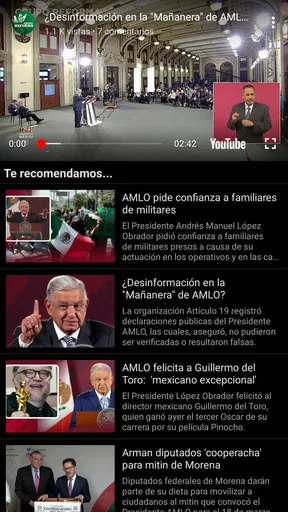
Another cool feature is the integration of multimedia content. It’s not just about reading anymore—you can watch videos and listen to audio snippets directly within the app. It's like having a mini newsroom in your hand, offering diverse content to consume in your preferred format.
The User Experience
Using REFORMA feels smooth and seamless. The app is quick to load, and navigating through the different sections is a breeze. The font size is adjustable, which is a small but crucial detail for comfortable reading. Plus, the night mode is a lifesaver for those late-night news binge sessions.
The notifications are something I appreciate as well. Instead of bombarding you with every little update, REFORMA offers a smart notification system. You get alerts for the stories that matter most, so you’re not constantly interrupted by non-essential news.
Staying Updated Has Never Been Easier
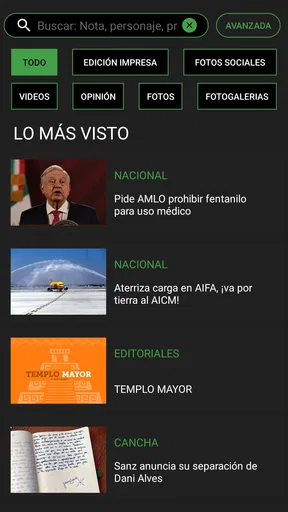
One of the things I love about REFORMA is the way it organizes news. You can easily switch between categories, from politics to sports, entertainment to science. It’s all neatly sorted, making it simple to find exactly what you're in the mood to read. The search function is also top-notch, allowing you to dive deep into archives and find past articles with ease.
For those who like to keep their news consumption structured, the app offers customizable notifications, allowing you to set reminders or alerts for specific topics or breaking news. It's like having a news assistant tweaking your feed based on what you want to see more or less of.
Final Thoughts
In a world where staying informed is more crucial than ever, REFORMA makes it easy, enjoyable, and personalized. It’s not just about delivering news; it's about delivering the right news to you. Whether you're a casual reader or a news aficionado, this app caters to all. With its sleek design, personalized content, and offline capabilities, it’s a solid choice for anyone looking to keep up with the world in a more engaging and efficient way.
So, if you’re tired of the same old news cycle and want something that feels tailor-made for you, give REFORMA a whirl. It might just become your go-to news companion.
Choosing it over a general news feed
The practical choice is between a publication-centered app and an aggregator that pulls headlines from many outlets. An aggregator is usually the better fit if your main goal is to compare coverage in one place or scan a wide range of publishers quickly. REFORMA makes more sense when you want a direct reading relationship with Grupo REFORMA’s journalism and prefer to explore that coverage without a broad stream of unrelated sources competing for attention.
That focus is also a trade-off. A tailored feed can make a familiar publication easier to follow, but personalization should not become a reason to stop exploring beyond the stories you already click. I’d occasionally browse a section I do not usually open, especially when a major issue is unfolding. It is a simple way to keep a reading routine from narrowing into a loop of only familiar subjects.
Small habits that make the app more useful
For a short commute or a patchy connection, I’d choose articles deliberately before going offline rather than expecting a saved reading list to assemble itself at the last minute. The useful workflow is to identify what you genuinely have time to read, save those pieces while connected, then treat the offline session as uninterrupted reading. That turns the feature into a practical plan instead of a backup you remember only after losing signal.
For a busy day, I’d separate headline scanning from longer reading. A quick pass through the home screen can answer “what should I know about?”; later, search or the relevant section can help return to a subject when there is time to follow it more carefully. This is especially helpful in a shared household: one person can use the app for a brief check without occupying the device for a long session, and another can pick it up afterward.
Notifications are best treated as a convenience, not a complete news briefing. I would keep only the alerts that genuinely help me act or follow a developing topic, then open the app when I choose to read in depth. If alerts start interrupting family time or work, changing the notification routine is more useful than letting every headline set the day’s pace.
Who will appreciate it—and who may not
I’d recommend trying REFORMA if you want a focused way to follow Grupo REFORMA’s reporting, value a publication’s own sections, or need reading that can fit around commutes and short breaks. The adjustable text size and night mode also make it easier to adapt a session to different lighting and reading comfort. For a household, it can be a convenient shared starting point as long as people keep their own expectations about account use and purchases clear.
I’d look elsewhere if your priority is a broad, cross-publisher overview, or if you want a news experience built around comparing several outlets side by side. It may also be the wrong fit for someone who rarely reads this publication’s coverage and would rather select a set of sources independently. In those cases, a general news aggregator or the individual apps and websites of preferred outlets may match the goal better.
What to check before making it a routine
If you are deciding whether to keep it on a family device, first try a short session with the people who will actually use it. Notice whether they can find the sections they care about, whether the reading presentation suits them, and whether notifications feel helpful or intrusive. Then decide whether the device is shared casually or whether each person should use a separate device or account arrangement; do not assume that one person’s personalization or purchase choices represent everyone else.
The app’s free download lowers the barrier to trying it, but it does not mean every possible in-app item is free. I would make that distinction clear to younger users and anyone else who can access the shared device. The Teen rating is likewise a prompt for judgment rather than a household rule: adults should consider the reader and the stories in context, especially when current events involve upsetting subjects.
A grounded household verdict
For me, REFORMA is easiest to recommend as a focused reading option, not as a universal family news solution. Its strongest case is for people who want to follow Grupo REFORMA and appreciate a direct, organized route into its coverage. The offline reading and multimedia options can support different routines, while category browsing and search give readers ways to move beyond a quick headline check.
Pros
- User-friendly interface for easy navigation.
- Comprehensive news coverage with real-time updates.
- Customizable notifications for breaking news.
- Offline reading mode available for convenience.
- High-quality multimedia content enhances stories.
Cons
- Occasional ads can interrupt the experience.
- Some features require a premium subscription.
- Limited language options for non-Spanish users.
- App size may be large for some devices.
- Notifications can be overwhelming if not managed.
FAQs for REFORMA
What is REFORMA and what does it offer to users?
REFORMA is a comprehensive fitness app designed to guide users through personalized workout routines and nutrition plans. It offers a variety of features such as video tutorials, progress tracking, and community support. The app is tailored for both beginners and advanced fitness enthusiasts looking to improve their health and well-being.
Is REFORMA free to use, or does it require a subscription?
REFORMA offers a free version with limited access to basic features. For full access, including personalized workout plans and exclusive content, a subscription is required. Users can choose between monthly or annual plans, with discounts available for longer commitments. Always check the app for the latest pricing details.
Does REFORMA support multiple fitness levels and goals?
Yes, REFORMA is designed to accommodate various fitness levels and goals. Whether you're a beginner aiming to lose weight or an athlete looking to enhance performance, the app provides tailored routines and nutrition advice. Users can set specific goals, and the app adjusts its recommendations accordingly to ensure effective progress.
Can I use REFORMA offline, or does it require an internet connection?
While REFORMA requires an internet connection for initial setup, downloading new content, and accessing community features, many aspects can be used offline. Users can download workout videos and plans for offline access, making it convenient for use in areas without reliable internet connectivity.
How does REFORMA handle user data and privacy?
REFORMA prioritizes user privacy and data security. The app complies with industry standards, ensuring personal information is encrypted and securely stored. Users have control over data sharing settings and can review the app's privacy policy for detailed information on how their data is used and protected.


